
Shopify rental deposits: charge, refund, and write a damage policy
By Rakun Digital · Published October 7, 2026 · Updated November 15, 2026
A security deposit gives renters a reason to bring items back on time and in good condition, and gives you a buffer when they do not. It also creates work: you have to collect it, explain it, decide what to keep, and give the rest back. This guide covers how deposits work in RD Rentals, how to refund them in Shopify, and how to write a damage policy customers can understand before they book.
How deposits work in RD Rentals
A deposit in RD Rentals is a flat amount per rented unit. It is not a percentage of the rental price and it does not change with the number of days. You set it in two places:
- Per variant. On the product's configuration page, the Deposit section has a Security deposit field. Set it to 0 to turn the deposit off for that variant.
- Store default. Under Settings, the Default deposit is used when a rental product does not have its own deposit. It is a starting value; a variant's own setting always wins.
If a customer rents two units of the same variant, they pay the deposit twice. Upgrades (such as a case or a spare battery) are priced separately and are not part of the deposit. For other add‑ons such as cleaning fees, see the add‑ons and damage protection guide.
What the customer sees
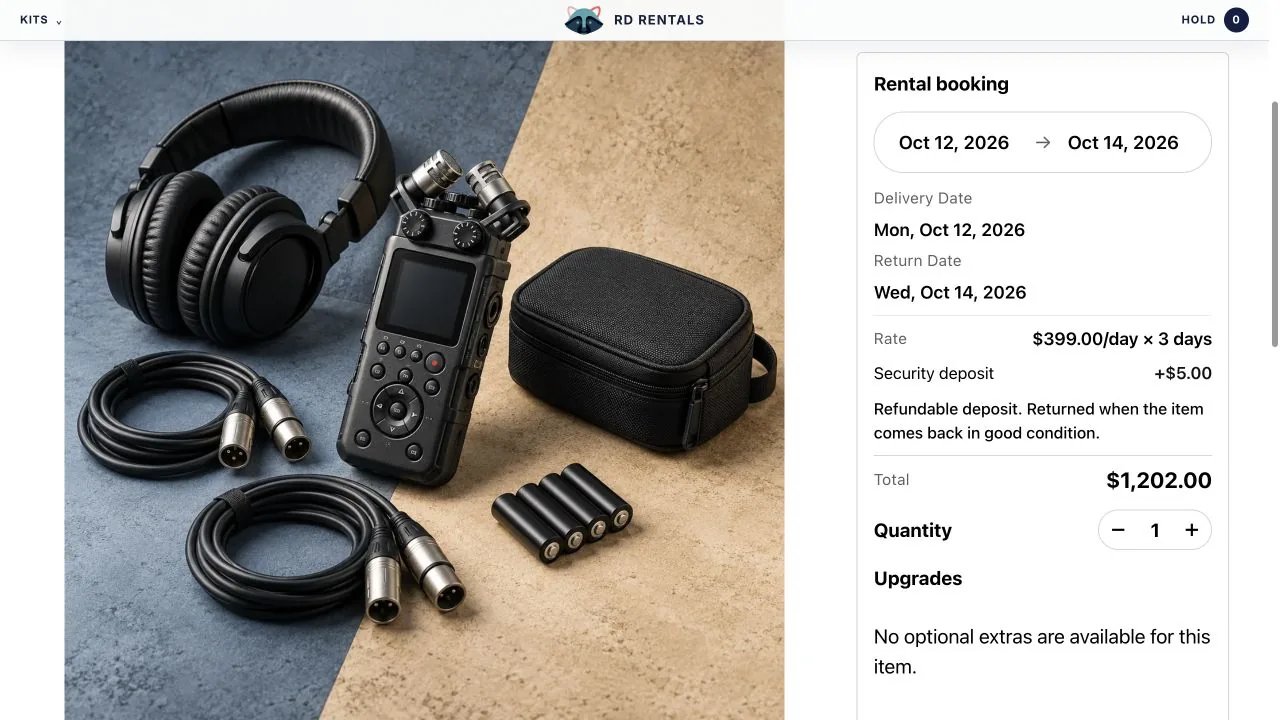
On the product page, the calendar summary shows a Security deposit row with the note: Refundable deposit. Returned when the item comes back in good condition. The total includes the deposit. You can rename the deposit label in the calendar block settings, but the note itself is fixed, so your written policy should be consistent with it.
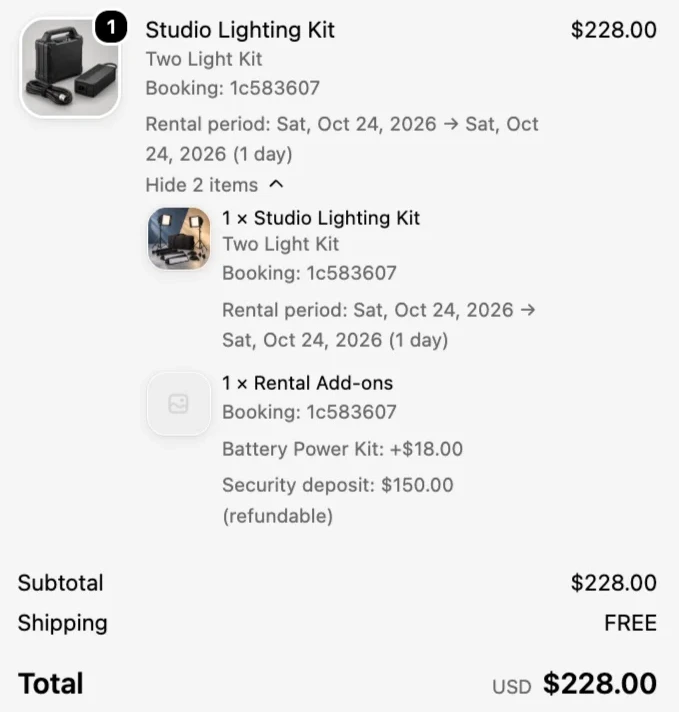
In the cart and at checkout, the rental price and the deposit are kept apart. The deposit, together with any upgrades, is added as a separate component of the rental line, labelled Security deposit with the amount marked as refundable. RD Rentals uses a hidden helper product called Rental Add-ons for this. The app creates it for you; it is not published to your online store and customers cannot buy it on its own.
Charged now, refunded later
The deposit is charged at checkout as part of the order total, using whatever payment method the customer chooses in the normal Shopify checkout. It is not a card authorization that is held and released later. That has practical consequences:
- The money is in your payouts like any other sale, so you can refund it whenever the item comes back, even weeks later.
- Giving it back is a refund you issue from the Shopify order. RD Rentals does not refund deposits automatically.
- How quickly the customer sees the refund depends on their payment method and provider, not on RD Rentals.
- Payment processing fees on the original charge follow your payment provider's refund terms. Check them before you choose a large deposit.
RD Rentals bills per paid rental order, not per amount: the first 10 paid rental orders each month are free and each one after that is $0.50. A bigger deposit does not raise the app fee. The rental app pricing guide compares this with monthly plans.
Tax on the deposit
Shopify calculates tax at checkout; RD Rentals does not. The deposit is charged on the hidden Rental Add-ons product, which the app creates with Shopify's default tax option, so Charge tax on this product stays on. If your store collects tax, the deposit is taxed at your normal rate until you change that.
In many places a refundable security deposit is not a taxable sale, because you hold it and give it back rather than selling something for it. Rules differ by country and state, though, and a deposit you keep to cover damage can become taxable when you keep it. Confirm the right treatment with your accountant or local tax authority.
To stop tax on the deposit, open Rental Add-ons under Products in your Shopify admin and untick Charge tax on this product in the Pricing section. Know the limitation first: the deposit and any upgrades share that one Rental Add-ons line, so they always get the same tax treatment, and a Shopify tax override on the product would cover both too. If your upgrades must be taxed and your deposit must not, RD Rentals cannot separate them today. Contact us if that affects your shop.
Choosing a deposit amount
There is no single right number. A deposit that is too low does not cover real damage; one that is too high puts people off booking. Work through these questions for each item, or each group of similar items:
- What would it cost you to repair or replace? List the parts that break most often and what fixing them costs, including your time and any shipping.
- How likely is damage? Delicate, high-handling items (electronics, event decor, kids' gear) justify more cover than sturdy ones.
- What does the customer compare it to? A deposit far above the rental price draws attention. A modest deposit plus a clear policy for bigger damage often converts better than one large figure.
- Can you recover more if the damage exceeds it? RD Rentals does not charge damage fees, so anything above the deposit has to be agreed with the customer separately. If you cannot realistically collect extra, the deposit is your whole cover.
- Does each unit need its own deposit? Because deposits are per unit, a customer renting five chairs pays five deposits. For low-value items in bulk, consider a smaller per-unit amount.
Set a store Default deposit that fits most of your catalog, then override it on variants that are clearly more or less valuable. Revisit the numbers after your first few months of returns, based on your own damage records.
Writing your damage and deposit policy
A good policy answers the questions a customer will ask when something goes wrong, before it goes wrong. Keep it short enough to read on a phone and specific enough to apply the same way every time. Cover these points:
| Topic | What to decide and write down |
|---|---|
| What the deposit covers | Damage beyond normal wear, missing parts or accessories, excessive cleaning, and late return if you choose to deduct for it. |
| Normal wear | What you will not charge for: light scuffs, expected use marks, consumables that are meant to be used up. |
| Condition at handover | How you record condition when the item goes out (photos, a checklist) and how the customer can report an existing issue. |
| Inspection after return | How many days you take to inspect after the item is back, and that the refund follows inspection. |
| How deductions are worked out | Repair cost, replacement cost for lost parts, or a fixed cleaning fee. Say that you will explain and document any deduction. |
| Refund timing | When you issue the refund after inspection, and that bank processing time is extra. |
| Damage above the deposit | Whether you will ask the customer to pay more and how. RD Rentals cannot charge this automatically. |
| Late and lost items | What happens if the item comes back late or not at all. |
| Cancellations | Whether the deposit (and the rental fee) is refunded if the customer cancels before the rental starts. |
A starting template
Replace the bracketed parts and remove anything that does not apply. Keep the wording consistent with the calendar note that the deposit is returned when the item comes back in good condition.
- Each rental includes a refundable security deposit of [amount] per item, charged at checkout.
- We inspect returned items within [number] business days. If the item comes back complete, on time, and in good condition, we refund the full deposit to your original payment method.
- Normal wear, such as [examples], is never deducted.
- We may deduct the reasonable cost of repairing damage, replacing missing parts, or [cleaning]. We will email you photos and a breakdown of any deduction before refunding the rest.
- If repair or replacement costs more than the deposit, we will contact you about the difference.
- Items returned more than [time] late may be charged [amount or rule] from the deposit.
- If you cancel at least [time] before the rental start, we refund [rental fee and deposit / deposit only].
Where to publish it
- Your store's policy pages in Shopify (Settings, then Policies), for example inside your refund policy or terms of service.
- A short summary in each rental product's description, linking to the full policy.
- Your order confirmation email, so customers have it after booking.
The calendar's Calendar hint setting in the theme editor is meant for date instructions, so keep the policy itself in the places above.
Refunding a deposit after the return
When the item comes back, close out the booking and the money in this order:
- Inspect the item against your handover record. Take photos of any damage.
- Mark it returned. Open the booking in the app's Bookings page and choose Mark returned. Returned bookings stop blocking the calendar, so if it came back early, the remaining dates open up for other customers. This updates RD Rentals only: Shopify Paid, Refunded, and Unfulfilled badges change when you refund or fulfill in admin, not here.
- Open the Shopify order from the order link on the booking page.
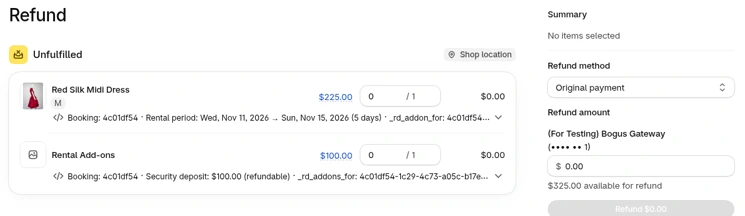
- Refund the deposit. In the order, choose Refund. The rental line and Rental Add-ons (deposit plus upgrades) are separate. For a deposit-only refund, set a custom Refund amount in the sidebar instead of refunding both lines in full. Leave Restock items unchecked unless you are cancelling the rental. Add a reason for your records.
- Tell the customer. If you kept part of the deposit, send them the breakdown and photos you promised in your policy. RD Rentals does not send this message for you.
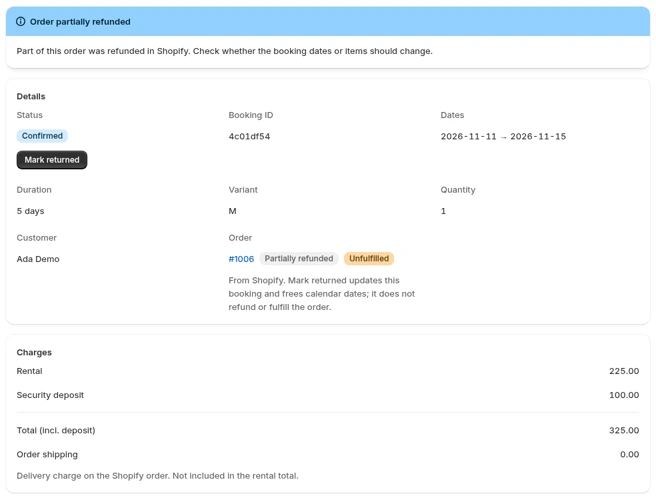
After a partial refund, the booking page shows an Order partially refunded notice asking you to check whether the booking dates or items should change. For a deposit refund nothing needs to change. The order link also shows a Partially refunded badge. Charges still lists what the booking was charged (rental, upgrades if any, deposit, and the total including deposit), so check the refund itself in the Shopify order.
Cancellations before the rental starts
If a customer cancels, cancel the order in Shopify and refund what your policy says. Cancelling is what releases the dates. A refund on its own does not: a fully refunded order that is not cancelled shows an Order refunded notice and its dates stay blocked until you cancel the order.
Unpaid orders are different. If the customer never paid, the booking shows Awaiting payment and only holds the dates for a limited time. There is no deposit to refund, and if the hold runs out the booking becomes Hold expired and the dates free up on their own.
Deposit checklist
- A store Default deposit is set, and high-value variants have their own amount.
- Variants that should not carry a deposit are set to 0.
- Your written policy matches the calendar note and covers the topics in the table above.
- The policy is on your Shopify policy pages and linked from rental product pages.
- You know your payment provider's refund timing and fee terms.
- Your team knows the return routine: inspect, mark returned, refund, notify.